Open source · MIT · Bring your own key

Your browser,
driven by AI.

OpenSidebar is an open-source Chrome extension that puts an autonomous agent in your side panel — describe a task in plain English and it sees the page, clicks, types, and carries multi-step work across tabs to done.

Bring your own API key. The recommended account connection stores supported keys encrypted and relays without retaining task content. Direct from this browser remains available as an advanced option. Optional reliability summaries stay local, off by default, and under your control.

The extension runs entirely in your browser 50+ browser tools Vision + planning + verification
▶ 60-sec tour OpenSidebar side panel driving a web task
Quick start

From clone to first task

Install the signed release from the Chrome Web Store, or build from source and load the unpacked extension for development.

Chrome Web Store

One-click install

Add the signed OpenSidebar release straight from Chrome.

Add to Chrome
From source

Load the unpacked build

# clone & build
git clone https://github.com/krisshkodrani/OpenSidebar
cd OpenSidebar
corepack enable
corepack pnpm install
corepack pnpm run dist

# then in Chrome
chrome://extensions  Developer mode 
Load unpacked  select dist/

Requires Node.js 22+ and a supported provider API key.

Recorded live

Choose the tour made for you

Start with the one-minute customer overview, or go under the hood with the developer tour. Both use real recorded runs.

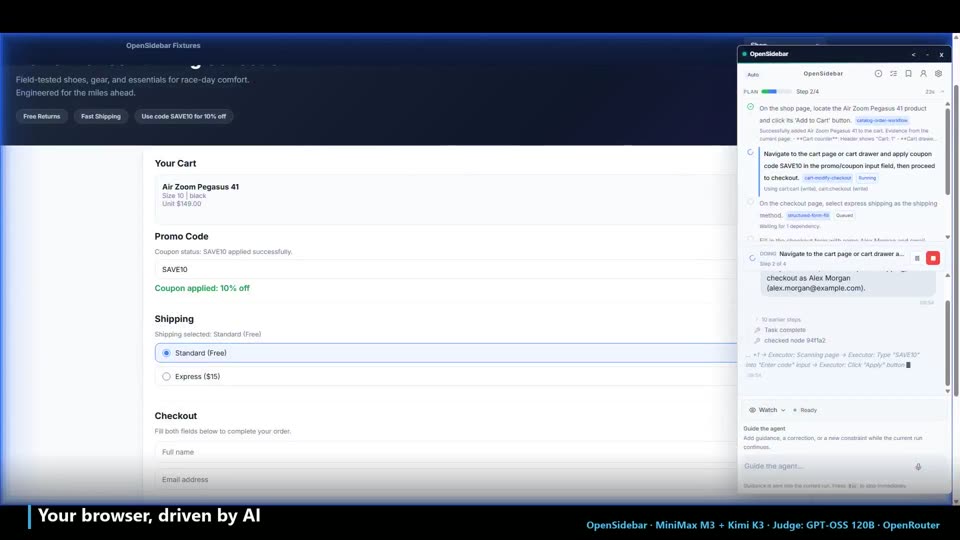
▶ For customers · 58 sec Agent completing a checkout on a shopping site

What OpenSidebar does for you

See the side-panel agent complete a checkout, carry information between pages, watch for a change, and operate a business app.

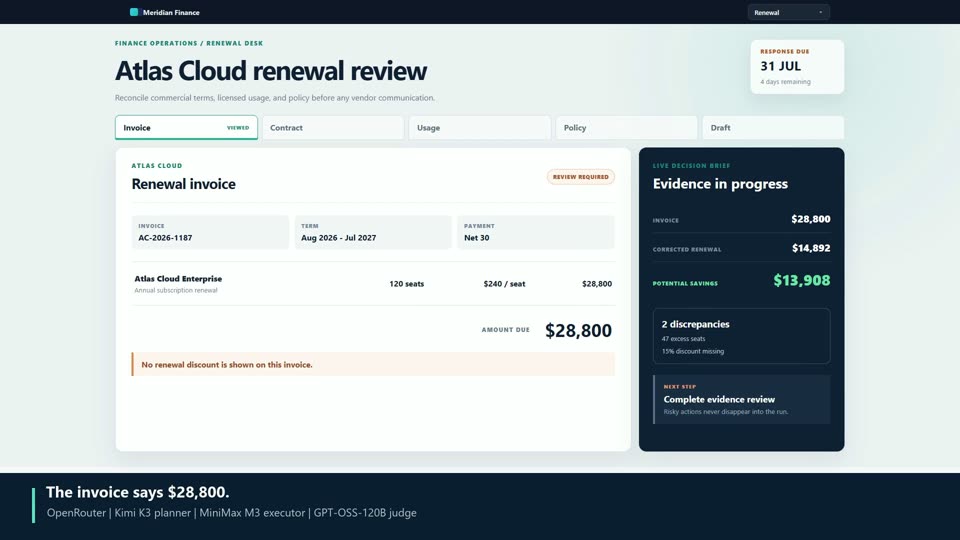
▶ For developers · 95 sec OpenSidebar investigating a multi-page workflow with its side panel visible

How the agent earns a result

Follow planning, execution, approval gates, verification, trace evidence, and per-task cost across two complex runs.

Real sessions, edited for pacing and captions. Current model details remain visible in each recording; the architecture supports multiple providers and role-specific models.

Under the hood

See the plan, not just the run.

Every demo above is a recorded run — and every run starts with a plan. The walkthrough page replays four real traces click by click: the prompt, the planner's subtask chain, the executor's actual page actions, and the verifier's verdict on each step, with the model named at every stage.

What it does

An agent that sees, plans, acts — and stays in your control

Sees the page like you do

A vision model works from the live screenshot and DOM — reads charts, zooms into fine print, and handles pages that defeat text-only bots.

50+ browser tools

Clicking, typing, and scrolling, plus file upload and download, tab and window management, and structured read-outs of tables, chart labels, and active filters — the agent gets data out of pages, not just actions into them.

Safe by default

Approvals are on by default, and consequential actions — submitting a job application, sending a message — always pause for you. When the agent works from a draft you approved, the final submit is checked field-by-field against that draft; any mismatch stops and shows you the difference before anything is sent.

Plans, executes, verifies

A planner decomposes the task, an executor drives it, and a verifier confirms the result — high-risk completions get a second opinion from a dedicated judge model. Stuck runs escalate to a stronger model instead of burning turns.

Remembers what matters

A local profile you review yourself, per-site skills you record once and reuse, and checkpoints that survive restarts (kept for 24 hours). Sensitive fields are consent-gated per task and encrypted with a key that never leaves your machine.

Watch Mode

Point it at a page and it re-checks every few seconds, comparing what actually rendered — then tells you when a price, a status, or a listing changes.

Speak or type

Add a Groq API key in settings and voice input transcribes your words straight into the composer (Whisper large-v3-turbo) — describe the task out loud and let it run.

Yours to inspect

Every session produces detailed local run diagnostics. Direct from this browser keeps keys in Chrome storage and connects directly to your providers. An account connection stores supported keys encrypted and relays requests without retaining task content.

Bring your own key

Your provider. Your models. Your data.

OpenRouter recommended Fireworks

OpenRouter is the recommended default; Fireworks is the supported alternative. Direct from this browser keeps API keys in Chrome storage and sends page context directly to your provider. The recommended account connection supports encrypted OpenRouter and Fireworks credentials with a non-retaining relay. This release has no advertising analytics client or crash reporter.

In the open-source repo · developer builds

Every run leaves evidence.

The repo ships a full observability workspace: replay any run as a story — plan, nodes, turns, verification — with the judge model's per-criterion reasoning and cost on high-risk completions, then record whether the outcome was actually right. Traces never leave your machine.

  • MIT licensed. Audit every claim on GitHub.
  • Nx + pnpm monorepo. Manifest V3, Vitest, staged e2e harness.
  • Local trace viewer. Replay plans, actions, verification, approvals, and cost without sending traces elsewhere.
▶ Developer tour OpenSidebar investigating a multi-page workflow with its side panel visible